Top pairs

How to Pair F9 Earbuds With an iPhone, Android and Each Other

Buds out, Bluetooth on, tap the name: pairing an F9 takes under a minute. The trick is letting the two buds find each other before your phone joins in.

Fresh as of September 2026
Quick answer

Take both buds out of the case in the same second and give them a few seconds to link; one bud keeps blinking. Open Bluetooth on the phone, tap the name that appears, often F9 or a model code, and wait for the Connected prompt. From then on the buds rejoin that phone by themselves.

  • Two names in the list? Pick the one without BLE
  • Sound in one ear only? Both back in the case, 10 seconds, both out together
  • Laptops and tablets pair through their own Bluetooth settings
1 BSWLMDD F9 Earbuds
Pop-up pairing on the phone BSWLMDD F9 Earbuds
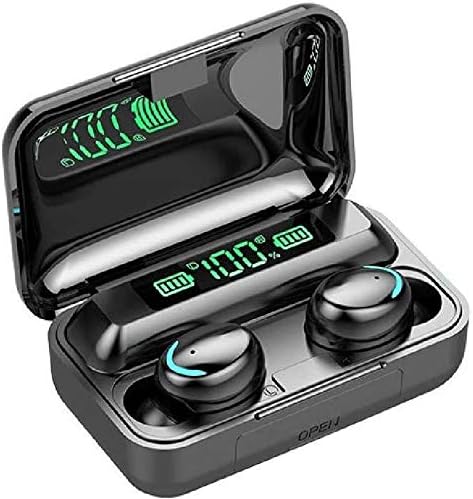
Bluetooth 5.3 buds that raise a connect prompt on the phone when they leave the case.
  • 1,200mAh case charges your phone
  • LED battery readout on the case
  • Bluetooth 5.3
Grab this pair
3 MDNS BTH-F9-5 Sport Earbuds
One-step sync MDNS BTH-F9-5 Sport Earbuds
Lift both buds together and they synchronize, then join the phone; IPX7 buds, 2,000mAh case.
  • 2,000mAh case charges your phone
  • LED battery readout on the case
  • IPX7 sweat and splash rating
Grab this pair

Both buds out at once, linked to each other

F9 earbuds are two separate radios. Before any phone sees them, one bud takes the lead and pulls the other into a stereo pair, the link makers call TWS.

That link starts when both buds leave the case together. MDNS puts it plainly for its BTH-F9-5: remove both earbuds at the same time to synchronize. Voltstech and NC describe the same one-step move for their F9-5 and 2,200mAh F9.

  1. Charge the case and buds so both halves wake up.
  2. Lift both buds out in the same second.
  3. Wait three to five seconds; a chime or a voice prompt marks the link on most boards.
  4. Watch the lights. One bud keeps flashing, often red and blue, and the other dims or goes steady.

The flashing bud is the one calling out to your phone. That is your cue to open Bluetooth settings.

Pulled one bud out early? Dock both, shut the lid, count to 10 and start over. Pairing half a set with the phone first is the classic route to sound in one ear only.

Single-bud listening still works once the pair is linked. The Total-shop Mini F9 and the Volt Plus Tech F9 V5.3 Pro both let one bud play alone. Handy on a bike ride, where one open ear keeps you aware of traffic.

Key numbers

Where to tap on each device

DeviceMenu pathWhat to tapCheck after pairing
iPhone or iPadSettings › BluetoothThe F9 name under Other DevicesConnected prompt in the buds
Pixel, Motorola and most AndroidSettings › Connected devices › Pair new deviceThe F9 name under Available devicesMedia audio switched on
Samsung GalaxySettings › Connections › BluetoothThe F9 name under Available devicesMedia audio switched on
Windows 11 laptopSettings › Bluetooth & devices › Add device › BluetoothThe F9 name in the scanStereo output set as default
MacSystem Settings › BluetoothConnect next to the F9 nameOutput set to the buds

Menu names from current iOS, Android, One UI, Windows 11 and macOS releases; older versions word them slightly differently.

iPhone on the bench, F9 in the list

An iPhone finds F9 earbuds on the same Bluetooth screen it uses for any headset. No app, no code, no account.

How to connect F9 earbuds to iPhone, step by step

  1. Open Settings › Bluetooth and flip the toggle on.
  2. Take both buds out and let them link.
  3. Under Other Devices, wait for the name. Volt Plus Tech's F9 appears as F9, its F9 Mini as F9 Mini and its F9 Pro Touch as YD03.
  4. Tap the name. The buds announce Connected.

Some F9 boards show up twice, once for audio and once as a low-energy entry ending in BLE. Pick the plain name, since the BLE entry carries no sound.

After the first time, the iPhone handles it. Open the case at the gym door and the buds rejoin within seconds; the BSWLMDD F9 even throws up a connect pop-up as the buds come out.

  • Bud battery shows in the Batteries widget on boards with iOS power display, such as the Total-shop Mini F9.
  • Siri answers a long hold on the touch panel.
  • Calls route to the buds automatically once they are connected.

Older iPhones pair just as well. Any iPhone with Bluetooth audio handles an F9, since the buds speak the same headset profiles as every other wireless earphone. The only thing that changes between iOS versions is where the widget and the safety settings sit.

iPhone refusing to show the buds? Another phone may still hold them. Switch Bluetooth off on the old device, or run the F9 factory reset to clear every stored pairing.

Pair vs pair

Bluetooth and pairing, side by side

BSWLMDD F9 Earbuds BSWLMDD F9 Earbuds DCBCODGAL CF9 Mirror-Lid Earbuds DCBCODGAL CF9 Mirror-Lid Earbuds MDNS BTH-F9-5 Sport Earbuds MDNS BTH-F9-5 Sport Earbuds BMHOLU F9-5 Ear-Hook Earbuds BMHOLU F9-5 Ear-Hook Earbuds NC F9 with 2,200mAh Case NC F9 with 2,200mAh Case
TypeF9F9F9-5F9-5F9
Case1,200mAh power bank—2,000mAh power bank500mAh case2,200mAh power bank
Battery readoutYesYesYesYesYes
Water rating—IPX7IPX7IPX7IP7
BluetoothBluetooth 5.3Bluetooth 5.3Bluetooth 5.0Bluetooth 5.3Bluetooth 5.0
Playtime (with case)48h with the case15h with the case—30h with the case126h with the case
Grab this pair Grab this pair Grab this pair Grab this pair Grab this pair
Spec sheet

Full specs, top three pairs

BSWLMDD F9 Earbuds
BSWLMDD F9 Earbuds
Model
F9 (BSWLMDD)
Bluetooth
5.3
Rated range
About 33 ft (10 m)
Case battery
1,200mAh, doubles as emergency phone power
Battery display
LED percentage on the case
Playtime per charge
Up to 8 hours (maker's figure)
Playtime with the case
Up to 48 hours (maker's headline)
Charge time
About 2 hours, buds and case
Water rating
IP5, sweat and rain (maker's label)
Controls
Touch: play, pause, calls, volume
Microphone
Call mic with ambient-noise blocking
Driver
Dynamic, 20Hz–20kHz
Full rundown →Grab this pair
DCBCODGAL CF9 Mirror-Lid Earbuds
Model
CF9 (model number F9)
Bluetooth
5.3
Rated range
10 m (about 33 ft)
Water rating
IPX7
Battery display
Digital: case plus left and right bud
Lid
Mirror finish, processed plastic, not glass
Extra playtime from case
Up to 15 hours
Charge time
About 2 hours
Call controls
Answer, reject, hang up by touch
Music controls
Play, pause, previous, next by touch
Volume
Swipe on the bud
Voice assistant
Wake by touch
Full rundown →Grab this pair
MDNS BTH-F9-5 Sport Earbuds
Model
BTH-F9-5
Maker
Shenzhen VISION Electronics
Bluetooth
5.0
Rated range
10 m
Drivers
8mm dynamic
Frequency range
20Hz–20kHz
Bud battery
50mAh each
Playtime per charge
Up to 5 hours
Case battery
2,000mAh
Standby with the case
Up to 120 hours
Battery display
LED level on the case
Water rating
IPX7, up to 30 minutes submerged
Full rundown →Grab this pair

Android phone, connected before the bus comes

Android keeps pairing under Connected devices on most phones. Samsung, Motorola and Pixel menus look a little different, yet the route is the same.

How to connect F9 earbuds to Android phones

  1. In Settings, tap Connected devices, then Pair new device; on a Samsung Galaxy, go to Settings › Connections › Bluetooth.
  2. Take the buds out together and wait for the flashing bud.
  3. Tap the F9 name under Available devices.
  4. Accept the pairing request; contacts access is optional and the buds play fine without it.

Many F9s carry a phone model in their names. Volt Plus Tech sells the same F9 Mini and 2,000mAh F9 marked for Galaxy, Moto G and Fire tablet owners. Inside, every one is a standard Bluetooth headset, so any version pairs with any Android phone.

Buds connected but music still on the phone speaker? Tap the gear icon next to the F9 entry and switch on Media audio. With only Phone calls enabled, the buds handle calls and nothing else.

Mixing Bluetooth versions is fine. A Bluetooth 5.0 pair such as the MDNS BTH-F9-5 connects to a Bluetooth 5.3 phone at the 5.0 level with no extra steps. The newer chip on a pair like the Volt Plus Tech F9 with 2,000mAh case mainly buys a steadier link through a jacket pocket.

Standout pair

Lid open, already connected

BMHOLU F9-5 Ear-Hook Earbuds
Best for open-and-go reconnects BMHOLU F9-5 Ear-Hook Earbuds

The BMHOLU F9-5 powers on and rejoins the last phone the moment its lid opens. Soft ear hooks keep the Bluetooth 5.3 buds in place once they are playing.

Grab this pair

Laptop, tablet or TV for the cool-down stretch

F9 earbuds pair with anything that plays standard Bluetooth audio. Laptops, tablets and smart TVs all work through their own Bluetooth menus.

  • Windows 11: open Settings, go to Bluetooth & devices, hit Add device and choose Bluetooth.
  • Mac: System Settings › Bluetooth, then Connect next to the F9 name.
  • iPad or Android tablet: the same steps as the phone.
  • Streaming stick or TV: the accessories or remotes menu, under Bluetooth.

An F9 streams to a single source. To move from phone to laptop, switch Bluetooth off on the phone first, and the buds accept the laptop.

Laptops tend to jump to the hands-free profile when a call app opens, and music turns flat and tinny. Set the stereo output, often labelled Headphones or Stereo, as the default playback device in sound settings.

Gaming or watching video on a laptop? Bluetooth adds some delay on any F9. The Harigal F9-5C Mirror Case answers that with a four-tap game mode for lower lag.

  1. Stay in the same room as the laptop; walls cut range well short of the 10 metres most F9 makers quote.
  2. Charge the buds first, because weak cells drop the link earliest.
  3. Keep the laptop's Bluetooth drivers current on Windows.

Treadmill screens and gym bikes with Bluetooth audio follow the same routine. Put the machine in pairing mode, lift the buds out, and pick the F9 name from its list.

On the chart

Bluetooth versions across the F9 range

F9 families by the Bluetooth version each maker states. Every version pairs with any current phone, laptop or tablet.

Rain run tomorrow, reconnect on autopilot

Pair once and an F9 reconnects by itself. Open the lid, lift the buds, and they head straight back to the last device they knew.

The BMHOLU F9-5 turns on and connects the moment its case opens. NC's 2,200mAh F9 links the buds to each other and to the last paired phone the moment they clear the cradle.

  • Leave Bluetooth on at the phone; the buds cannot wake a switched-off radio.
  • Put the buds away in the case, not loose in a pocket, so they power down and restart cleanly.
  • Pair a second phone only while the first is out of range or off.

When autopilot fails, it tends to fail in one of three ways. Work through them fastest first:

  1. Buds light up but the phone ignores them: forget the F9 entry and pair again.
  2. Sound in one ear only: dock the pair for 10 seconds, then lift both out together.
  3. Neither bud lights: charge the case and buds with the F9 charging routine.
Still stuck after all three? The full clear-and-relink sequence is in the F9 reset walkthrough, along with what each light pattern means.

Once the link is solid, the F9 tap controls handle tracks, calls and volume without touching the phone again.

Quick answers

Before the first run

Why is only one F9 earbud connecting?

The phone paired with one bud before the two linked. Forget the F9 entry, dock the pair for 10 seconds, then lift both out together and pair again.

What name do F9 earbuds show in Bluetooth?

Usually F9 or a model code. Volt Plus Tech's buds appear as F9, F9 Mini or YD03 depending on the model.

How do I put F9 earbuds in pairing mode?

Take both out of the case. With no known device nearby they enter pairing mode on their own, and a flashing light on one bud confirms it.

Can F9 earbuds pair with an iPhone?

Yes. Open Settings › Bluetooth and tap the F9 name; no app is involved, same as any Bluetooth headset.

Can F9 earbuds connect to two phones at once?

Only one source plays at once. Switch Bluetooth off on the first device and the buds accept the second.

Next up

More F9 how-tos

More pairs

Other F9s for the bag