Top pairs

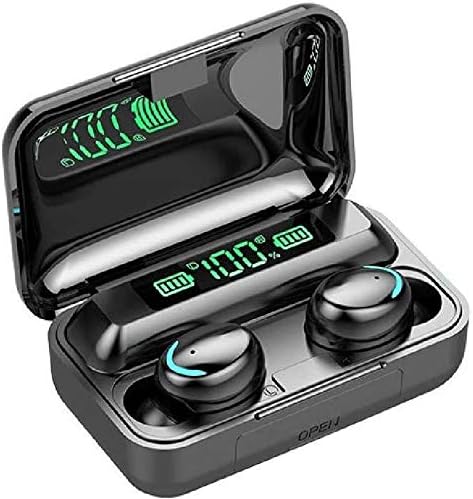
How to Charge F9 Earbuds and Read the LED Case Display

An F9 case is two things at once: a charger for the buds and, on most versions, a small power bank for your phone. Charge it right and one pair covers a week of gym sessions.

Fresh as of September 2026
Quick answer

Plug the case into a USB wall adapter with the cable from the box; the LED digits climb as it fills, usually over one to two hours. Drop the buds onto their cradles and they charge on contact. Buds play roughly 3 to 6 hours per charge, and the case refills them many times over.

  • Case won't charge? Try a USB-A to USB-C cable first
  • The USB-A socket on power-bank cases is an output for your phone
  • Store the pair half charged for long breaks
1 BSWLMDD F9 Earbuds
Everyday gym bag BSWLMDD F9 Earbuds
Bluetooth 5.3 buds and a case that shows its percentage and doubles as emergency power.
  • 1,200mAh case charges your phone
  • LED battery readout on the case
  • Bluetooth 5.3
Grab this pair
3 Huiye F9-5 with 3,600mAh Case
Weekend away Huiye F9-5 with 3,600mAh Case
3,600mAh case, the largest in the F9 range, with wireless charging and a percentage readout.
  • 3,600mAh case charges your phone
  • LED battery readout on the case
  • Bluetooth 5.0
Grab this pair

Case on the cable, digits climbing

Charging starts with the case, not the buds. Plug it into a USB wall adapter or a laptop port and the LED readout starts counting up.

Most F9 cases fill in one to two hours. BMHOLU quotes about 1 hour for its F9-5 case, NC and Avalanche Market about 1.5 hours, BSWLMDD and DB LLC about 2 hours.

  • USB-C input: NC's 2,200mAh F9, the Huiye F9-5 and the Volt Plus Tech F9 Pro Touch.
  • Micro-USB input: common on older F9 cases, so check the port shape before packing a cable.
  • Wireless charging: the Huiye F9-5 case also charges on a wireless pad.

A 5V adapter rated 1 to 2 amps is plenty. Fast chargers work too, because they fall back to 5V for a device that asks for nothing more.

First try the USB-C lead that shipped with the buds. Some budget cases ignore USB-C to USB-C leads and only charge from a USB-A to USB-C cable, a quirk of cheap charging circuits rather than a fault.

Then seat the buds. Each one drops onto a magnetic cradle and charges on contact. On the Harigal F9-5C Twin Display, charging cuts off at full, so an overnight top-up is safe.

Buds refill faster than the case. BMHOLU puts a full bud charge at about 40 minutes and Voltstech at about an hour, so a lunch break covers an evening session.

Key numbers

Case battery and what the case can do

PairCase batteryReadoutCharges a phone
BSWLMDD F91,200mAhCase percentageYes, as emergency power
MDNS BTH-F9-52,000mAhLED battery levelsPower-bank case
Volt Plus Tech F9 power bank2,000mAhCase and budsYes
NC F92,200mAhCase and budsYes, and stands the phone up
Voltstech F9-51,500mAhCase and budsYes, over its USB port
Huiye F9-53,600mAhPercentageYes, emergency charging
BMHOLU F9-5500mAhPower displayNot stated

Capacities and features as each maker states them. Real phone top-ups come out lower than the cell figure because of conversion losses.

Reading the LED percentage between sets

The glowing digits are the F9's signature. On some cases they show only the case's own charge; the better ones add each bud.

  • Case only: a percentage readout, as on the BSWLMDD F9 and the 3,600mAh Huiye F9-5.
  • Case and buds: the Volt Plus Tech 2,000mAh F9, NC's F9 and the Voltstech F9-5 show the case and the earbuds together.
  • Left, right and case, lid shut: the DCBCODGAL CF9 mirror lid and the Harigal F9-5C Mirror Case.
  • Twin screens: the Harigal F9-5C Twin Display splits the case percentage and left-right progress across two displays.

Flashing digits usually mean charging in progress; steady digits mean the case is idle. A reading that drops from 30 to 10 under a phone load is normal, since cell voltage sags while the case works hard.

The display draws a little power itself, so most cases blank it after a few seconds. Open the lid or seat a bud to wake it.

Read it the gym way: under 20 on the case means charge tonight, not after the next session.

A readout that shows each bud earns its keep when one side fades early. Spot it on the lid of the DCBCODGAL CF9 and clean that cradle before the side dies mid-run.

Pair vs pair

Power-bank cases, pair by pair

BSWLMDD F9 Earbuds BSWLMDD F9 Earbuds MDNS BTH-F9-5 Sport Earbuds MDNS BTH-F9-5 Sport Earbuds Volt Plus Tech F9 with 2,000mAh Power Bank Volt Plus Tech F9 with 2,000mAh Power Bank Huiye F9-5 with 3,600mAh Case Huiye F9-5 with 3,600mAh Case NC F9 with 2,200mAh Case NC F9 with 2,200mAh Case
TypeF9F9-5F9F9-5F9
Case1,200mAh power bank2,000mAh power bank2,000mAh power bank3,600mAh power bank2,200mAh power bank
Battery readoutYesYesYesYesYes
Water rating—IPX7IPX7—IP7
BluetoothBluetooth 5.3Bluetooth 5.0Bluetooth 5.3Bluetooth 5.0Bluetooth 5.0
Playtime (with case)48h with the case———126h with the case
Grab this pair Grab this pair Grab this pair Grab this pair Grab this pair
Spec sheet

Full specs, top three pairs

BSWLMDD F9 Earbuds
BSWLMDD F9 Earbuds
Model
F9 (BSWLMDD)
Bluetooth
5.3
Rated range
About 33 ft (10 m)
Case battery
1,200mAh, doubles as emergency phone power
Battery display
LED percentage on the case
Playtime per charge
Up to 8 hours (maker's figure)
Playtime with the case
Up to 48 hours (maker's headline)
Charge time
About 2 hours, buds and case
Water rating
IP5, sweat and rain (maker's label)
Controls
Touch: play, pause, calls, volume
Microphone
Call mic with ambient-noise blocking
Driver
Dynamic, 20Hz–20kHz
Full rundown →Grab this pair
Volt Plus Tech F9 with 2,000mAh Power Bank
Model
F9 (Volt Plus Tech)
Bluetooth
5.3
Rated range
33 ft (about 10 m)
Case battery
2,000mAh power bank
Battery display
LED level for case and buds
Playtime with the case
24–26 hours (maker's figure)
Bud charge time
About 30 minutes (maker's figure)
Water rating
IPX7
Call processing
CVC 8.0 noise reduction
Controls
Touch: previous, next, volume, voice assistant
Driver
Dynamic, 8D bass tuning
Impedance
25.94 ohm
Full rundown →Grab this pair
Huiye F9-5 with 3,600mAh Case
Model
F9-5
Bluetooth
5.0
Stated range
Up to 196 ft with no walls in the way (maker claim)
Case battery
3,600mAh
Total cycle time
Up to 150 hours (maker figure)
Battery display
LED percentage on the case
Case charging
USB-C cable or wireless charging pad
Charging port
USB Type-C
Phone charging
Emergency top-up for other devices
Controls
Touch on both buds: volume, tracks, calls, voice assistant
Touch type
Fingerprint touch panel
Single-bud use
Yes, calls and music on one bud
Full rundown →Grab this pair

Five hours per bud, days per case

F9 earbuds battery life splits into two numbers: how long the buds play per charge and how many refills the case holds. Makers quote both, and they vary a lot across the range.

PairBuds per chargeWith the caseCase battery
MDNS BTH-F9-5Up to 5 h120 h standby2,000mAh
BMHOLU F9-5Up to 5 h music, 4 h talkUp to 30 h music500mAh
NC F95 to 6 hAbout 126 h extra2,200mAh
Voltstech F9-5Up to 6 h talkNot stated1,500mAh
Volt Plus Tech F9 Pro Touch5+ hAbout 25 h2,000mAh
DB LLC F9-5C3 to 4 h130 h standbyNot stated

Standby and total figures swing with volume, calls and temperature, so treat them as ceilings. A loud gym playlist and cold morning runs both cut real listening time.

  • Keep volume a notch below max; the drivers draw most at the top.
  • Between errands the buds belong in their cradle, not loose in a bag.
  • Charging a phone from the case eats bud refills fast.

Long weekend away? The biggest case in the range belongs to the Huiye F9-5: 3,600mAh with wireless charging. Every version's case capacity is lined up in the F9-5 vs F9-5C, Pro and Mini comparison.

Standout pair

Twenty refills in one case

NC F9 with 2,200mAh Case
Best for long trips between outlets NC F9 with 2,200mAh Case

NC's F9 pairs a 2,200mAh USB-C case with buds rated for 5 to 6 hours each. The case refills them about 20 times and tops up a phone in a pinch.

Grab this pair

Phone on 5%, case to the rescue

Most power-bank F9 cases hide a USB-A socket on the side. That socket is an output: plug your phone's cable into it and the case turns into a small power bank.

  1. Charge the case to full first.
  2. Plug your phone's own charging cable into the case's USB-A socket.
  3. Open the lid, or press the case button on models that have one, if the phone does not start charging.
  4. Watch the digits drop, and unplug once the phone has enough for the trip home.

Expect a top-up, not a full refill. A 2,000mAh cell at 3.7 volts holds about 7.4 watt-hours, and after conversion to 5V roughly 60 to 70 percent reaches the phone. That is about a quarter to a third of a typical 4,000 to 5,000mAh phone battery.

Voltstech says it straight about its 1,500mAh case: charging a phone drains the power bank quickly. Plan on one emergency boost, then recharge the case before the buds need it.

F9 earbuds power-bank cases across the range:

  • 2,000mAh: the MDNS BTH-F9-5, the Volt Plus Tech F9 and the Avalanche Market F9-5.
  • 2,200mAh: NC's F9, which also stands the phone up as a holder.
  • 3,600mAh: the Huiye F9-5, the largest of the lot.

Slim pockets beat power banks on some days. The F9 Mini from Volt Plus Tech drops the phone-charging feature for a thin case that disappears into running shorts.

On the chart

Case capacity across F9 pairs

Charging-case battery capacity as each maker publishes it. Bigger cases refill the buds more often and can top up a phone; the smallest only charge the buds.

Dead case the night before a race

A case that will not charge usually comes down to a cable, a port or a deeply drained cell. Work through the causes in order and most cases come back.

  1. Swap the cable, then the adapter. A USB-A lead from an old phone is the best test.
  2. Make sure you are in the input port. On power-bank cases the USB-A socket only gives power out.
  3. Look into the port with a torch. Pocket lint packs in tight; lift it free with a wooden toothpick.
  4. Leave a flat case plugged in for 30 minutes before judging it, since a deeply drained cell can show nothing at first.
  5. Pull the rubber plug fully clear on the Voltstech F9-5 and the Harigal Twin Display; a half-open flap blocks the connector.

Case charges but the buds do not? Clean the pins in each cradle and the contacts on each bud with a little isopropyl alcohol, then reseat. The F9 reset steps help when a bud charges yet stays silent.

  • Never charge a wet case; dry it for a day first.
  • Store the pair around half charge for long breaks.
  • Retire a case that swells, smells hot or cuts out at random.
Cold drains charge fast. After a winter run, let the case warm to room temperature before plugging it in, because lithium cells should not charge below freezing.
Quick answers

Before the first run

How long do F9 earbuds take to charge?

The case takes about 1 to 2 hours from flat, depending on the model. Buds refill in roughly 40 minutes to an hour on their cradles.

How long does the F9 earbuds battery last?

Buds play about 3 to 6 hours on a single charge, set by the model and how loud you play. The case adds anything from about 20 to over 100 hours of refills.

Why is my F9 earbuds case not charging?

Swap the cable first, ideally for a USB-A to USB-C lead, and check you are using the input port rather than the USB-A output. A deeply drained case may need 30 minutes before the digits light up.

Can the F9 earbuds charging case charge my phone?

Yes, on power-bank versions with a USB-A output. Expect a partial top-up: a 2,000mAh case gives a typical phone roughly a quarter to a third of a charge.

What does the number on the F9 case mean?

It is the case's remaining charge in percent. Cases with three readouts also show the left and right bud levels.

Next up

More F9 how-tos

More pairs

Other F9s for the bag