Top pairs

How to Factory Reset F9 Earbuds When One Side Goes Silent

One bud dead, the pair refusing to link, the phone blind to both: a factory reset clears old pairings and rebuilds the left-right link from scratch. It takes about a minute and a charged case.

Fresh as of September 2026
Quick answer

Forget the F9 on every phone that knew it and switch Bluetooth off. Charge the buds in the case, take both out, then hold both touch panels together for about 10 seconds until the lights flash rapidly. Put them back for a few seconds, lift both out together and pair them as new.

  • Clean the charging contacts before blaming the pairing
  • Boards that ignore the hold usually reset on five taps
  • How to fix F9 earbuds, in order: charge, contacts, reset, then replace
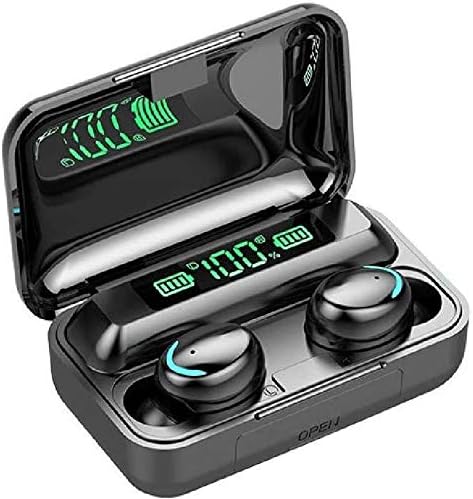
1 BSWLMDD F9 Earbuds
Fresh start after a dead pair BSWLMDD F9 Earbuds
Bluetooth 5.3 buds with touch controls and a case that shows its battery in digits.
  • 1,200mAh case charges your phone
  • LED battery readout on the case
  • Bluetooth 5.3
Grab this pair
2 DCBCODGAL CF9 Mirror-Lid Earbuds
See a flat bud before it fails DCBCODGAL CF9 Mirror-Lid Earbuds
The digital lid display shows the case and each bud, and the IPX7 buds shrug off rain.
  • LED battery readout on the case
  • IPX7 sweat and splash rating
  • Bluetooth 5.3
Grab this pair
3 Harigal F9-5C Twin Display
Every tap confirmed Harigal F9-5C Twin Display
A blue light ring answers each touch; twin screens show the case and both buds; IPX7.
  • LED battery readout on the case
  • IPX7 sweat and splash rating
  • Bluetooth 5.0
Grab this pair

Silent left bud? Rule out the charge first

When F9 earbuds have one side not working, the link between the buds is often fine. A bud that never charged in the case looks paired and plays nothing.

  1. Check the case readout with both buds seated. The DCBCODGAL CF9 and both Harigal F9-5C cases show each bud's level, so a flat side shows up straight away.
  2. Check the cradle. Buds sit on magnetic cradles and charge on contact; a bud tilted by a hair gets nothing.
  3. Clean the contacts. Sweat and skin oil dry into a film on the metal pins, and a swab dampened with isopropyl alcohol clears it.
  4. Charge for 30 minutes, then test again.
F9 bud cells are tiny: 35mAh on the BMHOLU F9-5, 50mAh on the MDNS BTH-F9-5. One dirty contact for a couple of days is enough to run a side flat.

Wax is the other quiet killer. Brush the speaker mesh with a dry soft brush. A plugged mesh sounds like a dead bud even when the link is perfect.

Rinsed the buds after a muddy trail run? Dry them for a day before they go back on the cradle. Water on the pins stops charging and can corrode the contacts over time.

Still silent with a full reading on the case? Then the link between the halves is broken, and the reset comes next.

Key numbers

Fixes lined up by symptom

SymptomLikely causeFirst fixIf that fails
One side silent, case shows fullBuds lost their linkBoth in the case 10 s, both out togetherFactory reset
One side never chargesDirty or tilted contactsClean pins with isopropyl alcohol, reseatCharge 30 minutes, then test
Both buds blink, no stereo linkEach bud pairing on its ownRepeat the reset, both out in the same secondCharge both to full first
Phone cannot find the budsBuds held by another deviceBluetooth off on the old deviceFactory reset
Paired, no soundMedia audio off or mesh blockedEnable Media audio in the F9 settingsBrush the speaker mesh
Neither bud lightsFlat caseCharge the case for 2 hoursSwap cable and adapter

Causes and fixes that apply across F9, F9-5, F9-5C, Pro and Mini boards; light colours and hold times vary a few seconds between makers.

The 10-second hold that wipes both buds

Most F9 boards share one reset routine: clear the phone, hold both panels, let the buds relink. Timings shift by a few seconds between boards, so watch the lights more than the clock.

  1. On the phone, open Bluetooth, tap the F9 entry and choose Forget This Device or Unpair. Repeat on every phone, tablet and laptop that knew the buds.
  2. Switch the phone's Bluetooth off so nothing grabs the buds mid-reset.
  3. Dock the pair for a minute to wake them with some charge.
  4. Take both out. Hold both touch panels at the same time for about 10 seconds.
  5. Keep holding through the power-off prompt until the lights flash quickly a few times, often red and blue or purple.
  6. Dock them again for 5 to 10 seconds.
  7. Lift both out together and wait until one bud flashes while the other settles.
  8. Turn Bluetooth on and pair them as if they were new.

Boards that ignore the long hold usually take taps instead. With the buds on, tap both panels about five times together; a double chime or a burst of flashes marks the wipe.

Final step on each device: the F9 pairing steps cover iPhone, Android and laptops.

A reset clears pairings only. The voice prompt language, the tap map and the battery stay exactly as they were.
Pair vs pair

Replacement pairs, case by case

BSWLMDD F9 Earbuds BSWLMDD F9 Earbuds DCBCODGAL CF9 Mirror-Lid Earbuds DCBCODGAL CF9 Mirror-Lid Earbuds MDNS BTH-F9-5 Sport Earbuds MDNS BTH-F9-5 Sport Earbuds Harigal F9-5C Mirror Case Harigal F9-5C Mirror Case Harigal F9-5C Twin Display Harigal F9-5C Twin Display
TypeF9F9F9-5F9-5CF9-5C
Case1,200mAh power bank—2,000mAh power bank——
Battery readoutYesYesYesYesYes
Water rating—IPX7IPX7—IPX7
BluetoothBluetooth 5.3Bluetooth 5.3Bluetooth 5.0Bluetooth 5.3Bluetooth 5.0
Playtime (with case)48h with the case15h with the case——120h with the case
Grab this pair Grab this pair Grab this pair Grab this pair Grab this pair
Spec sheet

Full specs, top three pairs

BSWLMDD F9 Earbuds
BSWLMDD F9 Earbuds
Model
F9 (BSWLMDD)
Bluetooth
5.3
Rated range
About 33 ft (10 m)
Case battery
1,200mAh, doubles as emergency phone power
Battery display
LED percentage on the case
Playtime per charge
Up to 8 hours (maker's figure)
Playtime with the case
Up to 48 hours (maker's headline)
Charge time
About 2 hours, buds and case
Water rating
IP5, sweat and rain (maker's label)
Controls
Touch: play, pause, calls, volume
Microphone
Call mic with ambient-noise blocking
Driver
Dynamic, 20Hz–20kHz
Full rundown →Grab this pair
DCBCODGAL CF9 Mirror-Lid Earbuds
Model
CF9 (model number F9)
Bluetooth
5.3
Rated range
10 m (about 33 ft)
Water rating
IPX7
Battery display
Digital: case plus left and right bud
Lid
Mirror finish, processed plastic, not glass
Extra playtime from case
Up to 15 hours
Charge time
About 2 hours
Call controls
Answer, reject, hang up by touch
Music controls
Play, pause, previous, next by touch
Volume
Swipe on the bud
Voice assistant
Wake by touch
Full rundown →Grab this pair
Harigal F9-5C Twin Display
Model
F9-5C
Bluetooth
5.0
Compatible with
iPhone, Android phones, tablets, laptops
Water resistance
IPX7; buds can be rinsed
Port protection
Soft rubber dust plug
Battery display
Twin LED screens: case percentage and each bud
Music with case
About 120 hours (maker figure)
Talk with case
About 150 hours (maker figure)
Case refills
About 25
Controls
Fingerprint touch on both buds
Play, pause, calls
One tap
Skip track
Two taps
Full rundown →Grab this pair

Red, blue, purple: what the flashes mean

F9 lights speak a simple code, and reading it saves guesswork. Exact colours differ by board, yet the patterns repeat across most of the range.

LightUsually meansNext move
Red and blue alternating on one budLead bud waiting for a phonePair now
Slow blink on one bud, the other darkLinked and connectedNothing to do
Both buds flashing red and blueEach bud hunting for a phone aloneReset the pair
Quick purple or double flashesPairing memory wipedBack in the case, then out together
Steady red on the cradleBud chargingLeave it seated
No light on the cradleNo contact or a flat caseClean the pins, charge the case

The Harigal F9-5C buds add a ring around each panel. It glows blue on the Twin Display to confirm a touch and green on the Mirror Case while music plays. A ring that never lights on one side points at charge, not pairing.

  • Both buds blinking like the lead side is the classic one-side-dead signature.
  • A bud that flashes once and dies is flat.
  • Lights normal but no sound: check the phone's output, then the mesh.

Cases with a full readout make the diagnosis quicker. On the DCBCODGAL CF9 and the Harigal F9-5C Twin Display, each bud's level sits next to the case figure.

Standout pair

Built for the rain run

MDNS BTH-F9-5 Sport Earbuds
Best for a pair that survives soakings MDNS BTH-F9-5 Sport Earbuds

MDNS rates the BTH-F9-5 buds for 30 minutes under water, so rain runs do not end in a dead side. Lift both out together and they sync on their own.

Grab this pair

Buds that won't link together after the reset

Sometimes the reset runs and the halves still act like strangers. The cause is almost always timing, or one side with too little charge.

  • One bud out late: lift both in the same second, because half a second apart can split them.
  • Phone Bluetooth on: the phone grabs the first bud before the second arrives. Keep it off until the buds settle.
  • One side low: a bud near empty drops out of the link first. Charge both to full.
  • Old entries: a second phone or a car stereo still remembers the buds and calls them first.

Mixed-up buds are another trap. Left and right from two different F9 sets often refuse to link, even when they look identical, because each set is matched at the factory. Keep pairs apart in a shared gym bag.

Run the full sequence twice before calling a bud dead. The second pass often lands because both cells had extra time on the cradle.

Phone still cannot find the buds at all? Restart it, then scan with the buds held close. An F9 in pairing mode drops back to sleep after a few minutes, so open the case again if the scan comes up empty.

  1. Restart the phone.
  2. Flip the lid and pull the two buds out together.
  3. Scan within the first minute.
On the chart

The tiny cells inside each bud

Battery capacities the makers publish. A bud holds a tenth or less of its case, so one bad contact drains a side within days.

When a reset can't save a sweat-soaked bud

A reset fixes memory, not hardware. If a bud never lights, never charges and never chimes, the cell or the board inside has given up.

Water ratings decide how often that happens. IPX7 buds such as the DCBCODGAL CF9 and the MDNS BTH-F9-5 are built for rain and heavy sweat, and MDNS rates its buds for 30 minutes under water. The IPX3 and IPX4 ratings on the Volt Plus Tech F9 Pro models cover splashes, not soakings.

  • Volt Plus Tech notes its charging case is not waterproof; treat every F9 case with open ports the same way.
  • Never charge a bud that smells hot or looks swollen.
  • A case that charges buds but not itself needs its own fix, covered in the F9 charging steps.

Replacing the pair is often the quicker move, since F9s sit at the budget end of wireless earbuds. The BSWLMDD F9 runs Bluetooth 5.3 with an LED readout. The IPX7 CF9 adds a lid display for each bud, so a failing side gets caught early.

Picking the replacement by version? The F9-5, F9-5C, Pro and Mini comparison lines up case size, water rating and displays, so the next pair matches how wet and sweaty your sessions get.

Keep the new pair healthy with three habits:

  1. Seat both buds fully after every session.
  2. Wipe the contacts and tips weekly.
  3. Store the case charged, never flat for months.
Quick answers

Before the first run

How do I factory reset F9 earbuds?

Forget the buds on your phone and switch Bluetooth off. Take both buds out, hold both touch panels for about 10 seconds until the lights flash quickly, dock them briefly, then lift both out together and pair once more.

Why is one side of my F9 earbuds not working?

Either the bud is flat from a dirty or tilted contact, or the two halves lost their link. Clean and charge first, then run the reset.

Why are my F9 earbuds not pairing together?

Usually timing: one bud left the case late or the phone grabbed a bud before the second arrived. Keep Bluetooth off and lift both buds out in the same second.

Will a reset change the voice prompt language?

No. A reset only clears stored pairings; the prompt language is set in the bud firmware.

How do I fix F9 earbuds that won't charge?

Clean the pins in the cradle and on the buds with a little isopropyl alcohol, then swap the cable and adapter for the case.

Next up

More F9 how-tos

More pairs

Other F9s for the bag